Squad runner · Player guide
DNWarRun: steer first, upgrade for the threat that stopped you
DNWarRun combines continuous forward travel with a squad that fires automatically. Your job is to read the battlefield, choose a position and avoid damage while the squad handles shooting.
Guide checked against the published game and project records on October 13, 2026.
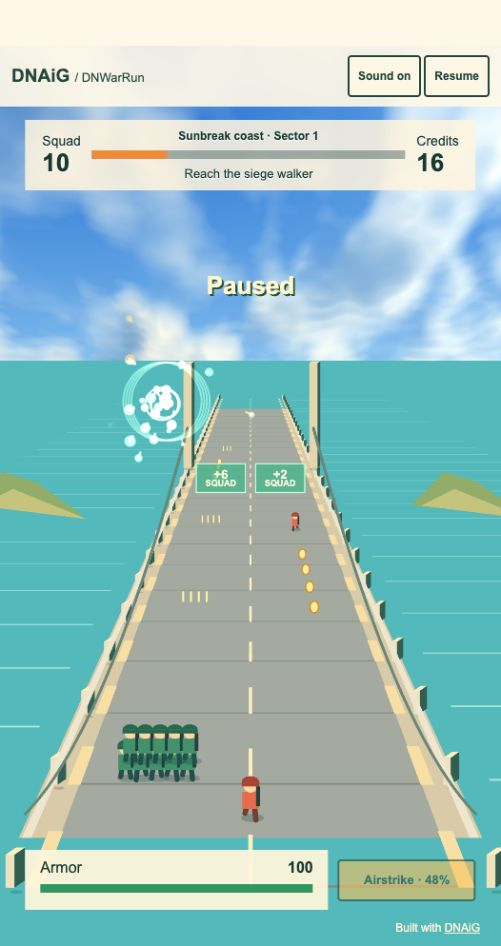
How to play
- Deploy and look ahead for gates, coins and enemy formations.
- Steer around attacks while the squad fires automatically. Save an airstrike for a threat you cannot handle safely by position alone.
- After a run, inspect the quartermaster’s upgrades before deploying again. Purchases apply to the next deployment.
Controls
- Mouse or touch
- Drag to steer. Use the Airstrike control when its charge is full.
- Keyboard
- Steer with arrows or A and D. Space uses a charged airstrike; P or Escape pauses.
Turn a defeat into a specific upgrade decision
If the squad repeatedly loses health by colliding with a heavy enemy, review the route you took before buying more firepower. Moving earlier may solve the immediate problem. If threats survive long enough to crowd the path despite clean steering, damage and firing-rate upgrades address a different weakness.
Unspent credits persist after defeat. You can save toward an upgrade instead of buying the first affordable option after every run. Armor, firepower and starting squad affect different parts of the next deployment.
Three decisions to practice
Look beyond the nearest pickup
A coin is useful only if the route to it leaves a safe exit. Read the gate or attack behind it before steering into its lane.
Keep room to change direction
The edges of the route reduce your escape choices. A central position can leave options on both sides until a gate or attack makes one direction preferable.
Time a charged airstrike
A full charge is a resource. Compare the present threat with the next visible formation before spending it.
Progress and practical notes
Switching away from the page pauses the run. Local progression stays in the current browser when storage works. Sound controls and pause remain available without interacting with advertising.
Behind the project: design and implementation notes
The short-session loop
Drag to steer, or use the arrow keys or A and D. Firing is automatic. Choose gates, collect coins and avoid enemies and commander attacks as the squad advances along a bridge. A full airstrike charge can be spent with Space or the Airstrike control. P or Escape pauses, and switching away from the page also pauses play.
Steering and firing have different responsibilities. Automatic firing lets the player concentrate on position, but that makes the readability of gates, projectiles and enemies especially important. An attractive effect should not hide the next decision.
World travel needs a common reference
Bridge posts, road markings, suspension spans and nearby scenery move consistently with forward travel. Distant terrain changes more slowly in perspective. These relationships help communicate speed without requiring the interface to display a separate speed meter.
The battlefield uses actual three-dimensional geometry and animated robot characters. Water and distant islands provide depth around the route. These elements use shared rendering capabilities, while the host owns the authored battlefield, collision rules and sector progression.
Different threats, different upgrades
Fast runners close the gap, gunners fire aimed shots, and armored enemies can deal heavier collision damage. Commanders introduce further patterns, including aimed spreads, lane sweeps and reinforcements. Recognizing which threat ended the previous run is useful before choosing an upgrade.
The quartermaster offers firepower, armor and starting-squad upgrades. Firepower changes damage and firing rate; armor increases maximum health; starting squad adds a soldier. Purchases apply on the next deployment. Unspent credits persist after defeat, so a failed run does not erase every opportunity to improve.
Rendering and continuity
This project defaults to the WebGL rendering path, with a WebGPU option for the game’s renderer. The distinction is a compatibility choice, not a promise that one backend is always faster. The same authored game rules should hold regardless of which graphics path draws the scene.
The run can be paused without buying anything or interacting with an advertisement. Sound controls remain available, and browser storage holds local progression when it can be used. A different device or browser profile starts with its own local state. Performance and sound behavior still depend on the actual device.