Block puzzle · Player guide
DNBlock: plan a whole hand, not just one placement
DNBlock gives you an eight-by-eight board and three shapes at a time. There is no timer. The interesting decision is how to make space for all three pieces while preparing a useful line clear.
Guide checked against the published game and project records on October 13, 2026.
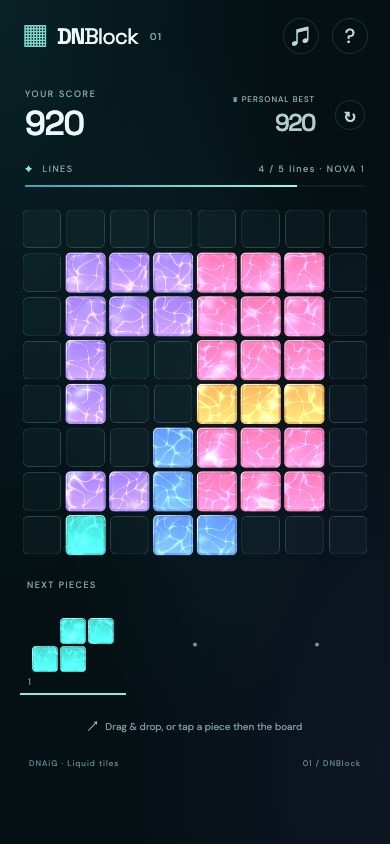
How to play
- Inspect all three shapes before placing the first one. Their orientations stay fixed during placement.
- Place a shape entirely on empty cells. A complete row or column clears immediately.
- Use all three shapes to receive another hand. The run ends when none of the remaining shapes fits.
Controls
- Mouse or touch
- Drag a piece onto the board, or select it and choose the top-left cell of its destination.
- Keyboard
- Select a piece with 1, 2 or 3. Tab to the board, aim with the arrow keys and place with Enter.
A small gap can be worth keeping
Imagine a row with six occupied cells followed by two empty cells. A horizontal two-cell piece completes it and frees the entire row. A single-cell piece placed in that gap first would leave only one empty cell, so the two-cell shape would no longer fit there.
Before spending a small piece, ask which larger piece needs that space. Sometimes the best first move is elsewhere on the board, leaving a clear available for the second or third move.
Illustrative row, not a captured game board.
Three decisions to practice
Keep one flexible open area
Scattered single-cell holes can look like spare room while fitting almost nothing. Preserve an area wide enough for the largest shape in the current hand.
Clear in a useful order
A clear can make the next placement possible. Check the board after each move rather than committing to a sequence that assumed the old layout.
Balance a score chase with survival
Simultaneous line clears and consecutive clears improve scoring. They are useful only if you can still place the rest of the hand.
Progress and practical notes
The browser keeps the current board and preferences locally when storage is available. Use the in-game controls to continue or start again; clearing site data can remove the saved run.
Behind the project: design and implementation notes
The placement loop
A hand contains three pieces. Choose one and place it on empty cells. A complete row or column clears, making space for later moves. Once all three pieces are used, a new hand arrives. Each new piece can be dealt in a different orientation, but that orientation stays fixed while you place it. There is no timer. The run ends when none of the remaining pieces fits.
The useful planning unit is the whole hand, not just the next piece. Before placing a small shape, check whether a larger one needs the same open area. A line clear can turn an impossible placement into a possible one, so the order of moves matters.
How scoring changes decisions
Each occupied cell in a placed piece contributes five points. Clearing lines adds one hundred times the square of the number of lines, multiplied by the current combo. Consecutive moves with clears increase that combo; a move without a clear resets it. For example, a three-cell piece that clears two lines on the first clear earns fifteen placement points plus four hundred clear points.
This rewards both preparation and timing. Chasing a large clear can improve a score, but leaving no space for the rest of the hand ends the run. Keeping a large open region is often more useful than filling every small gap immediately.
Input and visual feedback
Mouse and touch players can drag a piece, or select it and choose its top-left destination on the board. Keyboard players use the number keys one through three to select a piece, Tab to reach the board, arrow keys to aim and Enter to place. An invalid placement must leave the board unchanged.
The game separates the occupied cells used by its rules from the animated water-tile appearance. That separation matters: a ripple or highlight should never make a cell behave as if it moved. The changing sky provides atmosphere around a board whose logical grid remains stable.
Progress and browser data
The current board, hand, score and sound preference are stored in the browser when storage is available. Continuing on a different browser or clearing site data does not preserve that local progress. No player account is needed.
DNBlock is also the collection’s existing display-ad integration. Ad availability is independent of puzzle state: a missing advertisement should not block a move or require a click to continue. Advertising and data handling are described in the privacy page.